 iPhone & iPad · Scan Images, Extract Text
SnapText guides and tips
On-device OCR for iPhone: extract editable text from photos, screenshots and scanned documents, then copy, clean up, search or export it. No account, no tracking.
Quick answer
SnapText - Image to Text is a free iPhone & iPad app by Muhammad Shahid Khan (Scan Images, Extract Text). This page lists all 10 guides for it. Each one answers a single real question in plain language, with screenshots from the app.
SnapTextScan Images, Extract Text · Free on the App StoreDownload free →| Developer | Muhammad Shahid Khan |
|---|---|
| Price | Free on the App Store |
| Platform | iPhone & iPad |
| Guides | 10 |
| Languages | English, עברית, 简体中文, Español |
All SnapText guides
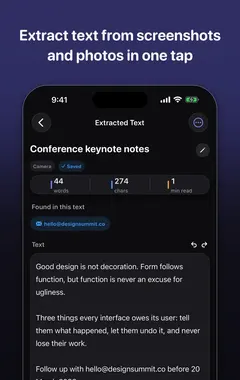
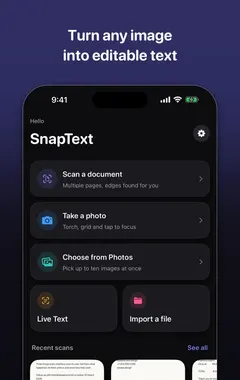 01How to Extract Text From an Image on iPhone (3 Easy Ways)Open the photo, touch and hold a word, drag, then tap Copy: that is Live Text. Plus the Camera method, and an OCR app for long text you want to edit, save or export.
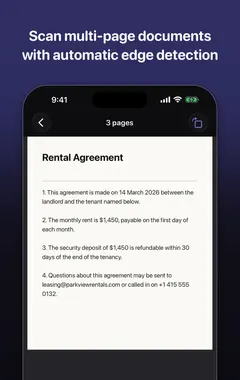 02How to Scan a Document to Editable Text on iPhoneTurn paper documents into editable text on iPhone: scanning vs OCR, a step-by-step guide, multi-page scans, cleaning up the text, and exporting it to other apps.
- 03How to Copy Text From a Screenshot on iPhoneCopy text from any screenshot on iPhone: using Live Text in Photos, or extracting all of it at once with SnapText. Plus fixes for when text won’t select.
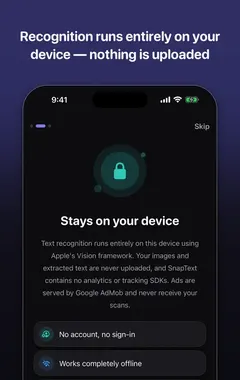 04Private OCR on iPhone: Why On-Device Text Recognition MattersMany image-to-text apps upload your photos to a server. Learn the difference between cloud and on-device OCR, what to check before scanning private documents.
- 0510 Tips for More Accurate OCR: Get Clean Text From PhotosWhy OCR misreads text and 10 practical tips to fix it: lighting, focus, angle, contrast, cropping, fonts and checking numbers. Works with any image-to-text app.
- 06Live Text Not Working on iPhone? 9 Fixes (and What to Use Instead)Why Live Text does not work on some iPhones or photos, and how to fix it: supported models, the Live Text switch, languages, camera settings and image quality.
- 07How to Convert Handwriting to Text on iPhone (Notes, Letters and Whiteboards)Turn handwritten notes into editable text on iPhone with Live Text, Scan Text or an OCR app, plus tips that make handwriting recognition far more accurate.
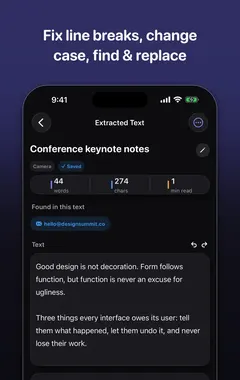 08How to Remove Line Breaks From Copied or Scanned Text (iPhone, Mac and Web)Why text copied from PDFs, photos and scans has broken lines, and how to fix it on iPhone, Mac and Windows: Find and Replace, Shortcuts, regex, and one-tap clean-up.
 09How to Translate Text From an Image on iPhone (Photos, Signs, Menus and Documents)Translate text in photos, screenshots, signs and documents on iPhone: Live Text Translate, the Translate app camera, and extracting text first for long documents.
- 10OCR for Students: Turn Lecture Slides, Textbooks and Notes Into Text on iPhoneHow students can use OCR on iPhone to turn lecture slides, textbook pages, whiteboards and handwritten notes into searchable text for revision, flashcards and essays.
Common questions about SnapText
Can iPhone extract text from an image?
Yes. On iPhone XS or later with iOS 15 or newer, Live Text lets you select and copy text in photos, screenshots and the Camera. OCR apps like SnapText extract all the text at once and let you edit, clean up and save it. Read guide →
How do I scan a document to text on iPhone?
Use an OCR app like SnapText: scan the page with the camera, let it recognise the text, clean up line breaks, then copy, share or export the text. Read guide →
Can I copy text from a screenshot on iPhone?
Yes. Open the screenshot in Photos, touch and hold a word, drag to select and tap Copy. This uses Live Text on iPhone XS or newer. Read guide →
What is on-device OCR?
Text recognition that runs on your phone itself, so the image does not need to be uploaded to a server. Read guide →
Why is my OCR result full of mistakes?
Almost always because of the photo: blur, low light, glare, shadows, an angled shot or small text. Retake the photo with bright, even light and the camera parallel to the page. Read guide →
Why is Live Text not working on my iPhone?
Your iPhone may be too old (it needs an XS, XR or newer on iOS 15+), Live Text may be switched off, the language may not be supported, or the text may be too small or blurred. Read guide →
Can iPhone convert handwriting to text?
Yes. Live Text, Scan Text and OCR apps like SnapText can read neat handwriting on iPhone XS, XR or newer. Read guide →
Why does text copied from a PDF have line breaks?
PDFs store lines of text, not paragraphs, so each printed line is copied with a line break at the end. Read guide →
How do I translate text in a photo on iPhone?
Open the photo, tap the Live Text button, then tap Translate. Or use the Camera tab in Apple’s Translate app. Read guide →
How can students use OCR?
To turn photos of slides, textbook pages, whiteboards and handwritten notes into searchable, editable text for revision and essays. Read guide →